
Technical guide
How should error handling and safe reprocessing be designed in integrations?
Safe reprocessing starts with sorting errors into classes. Only transient technical errors and cases with an unknown outcome are suitable for automatic retry, and for a retry to do no harm, the receiving side must not apply the same operation twice. Permanent errors and business errors need a human decision, and who makes that decision is set by a boundary written down in advance.
- Prepared by Castintech
- Last verified 23 September 2026
- 12 min read
- Sources
In this guide
Sections
Scope. This guide is not specific to any product. It is a general engineering framework for flows that run on messages or calls between systems, including integrations with SAP® software. The capabilities of the middleware, queueing and monitoring tools you use vary with the product and release; this guide does not describe any particular tool. The principles here are not attributed to SAP.
How are error classes separated?
Errors are separated by what happens on a retry and by who should decide. The same error message can fall into different classes, so classification rests on the cause of the error and the outcome of a retry, not on the error text. For each flow, the classes and how each is handled are written into the design document.
| Class | Example | Automatic retry | Who decides |
|---|---|---|---|
| Transient technical error | Brief network outage, temporary resource shortage, locked record | Yes, limited | Policy (automatic) |
| Permanent technical error | Wrong configuration, invalid credentials, missing field mapping | No | Technical team |
| Business error | Posting to a closed period, a value that breaks a business rule | No | Process owner |
| Unknown outcome | Timeout, connection dropped before the response | Check status first; retry only if idempotent | Policy, technical team if needed |
Text description of the diagram
Start: an incoming message carrying a transaction ID that does not change across retries. Decision point 1: the error class, judged by cause and by what a retry would do, not by message text; four classes are separated. The upper layer is the automatic policy. For an unknown outcome, the status is checked first; if the operation happened, there is no retry and the message counts as processed. If it did not happen or cannot be queried, it reaches decision point 2 together with transient technical errors: is the operation idempotent? If yes, the limited automatic retry loop runs: maximum number of attempts, increasing wait and random variation, overall time limit. The loop is bounded by a counter 1, 2, …, n. If a retry succeeds, the message is processed: the same transaction ID is not applied twice. When n is reached or a criterion is triggered, the loop stops: attempt or time limit, the same permanent error repeating, a maintenance window, an error-rate threshold, a broken order rule or doubt about data integrity; the stop decision is recorded. If the operation is not idempotent, there is no automatic retry. These two paths, the permanent technical error and the business error go down into the human decision layer below the layer boundary: waiting for a human decision; the message is not lost. The technical team decides on permanent technical errors, the process owner on business errors. There are three actions: correct and resend under control (idempotency and order are confirmed; bulk resends are tried on a small sample first), complete or compensate (after partial success, following a business rule written in advance), skip or cancel (the business side is notified). Boundary: business data is corrected through normal business transactions, not by editing the database directly. At the end, the audit trail records the message ID and business key, every status change, automatic retries, the stop decision and each intervention; regular reconciliation compares counts, amounts or keys on both sides and brings to light losses that never show up in error records. The only loop is the automatic retry loop, and it is bounded. On mobile the diagram reads as four panels in order: 1/4 message and error class, 2/4 status check and idempotency, 3/4 limited retry and stopping, 4/4 human decision, audit trail and reconciliation. Colophon: Castintech, D3, September 2026; technical explanatory diagram, not an SAP® product interface.
Why are technical and business errors handled separately?
Because they have different owners and different fixes. A technical error is fixed in the integration itself; a business error is fixed in the data or the process. When the two are mixed, either pointless retries are made for business errors, or the technical team starts correcting business data on its own.
The second is the more serious problem for audit and accountability.
A business error message should be written in terms the process owner understands: which record, which rule, what needs to be done. Technical detail stays in the record, but the information needed for the business decision is shown separately and clearly.
How is idempotency achieved?
Idempotency means that processing the same request several times has the same intended effect as processing it once. The HTTP standard (RFC 9110) defines this property and states that requests which are not idempotent should not be retried automatically unless they are known to be idempotent in practice [1]. In integrations, this property is usually designed on the receiving side.
The main techniques used:
- Operation identifier: the sender gives each business operation an identifier that stays the same across retries; the receiver stores it and, when the same identifier arrives again, returns the earlier result instead of repeating the operation.
- Natural business key: a key that is already unique, such as a document number, is used on the receiving side as a rule that prevents duplicate records.
- Version check: update messages carry the record’s version; the receiver does not apply a change that is older than the version it expects.
How long the operation identifier is kept is a design decision as well. The period should cover the latest time a retry could plausibly arrive; if it does not, a late retry may be processed as a new operation.
How are order and retries managed together?
The realistic assumption is that a message will be delivered “at least once”: retries are expected and the design allows for them. Order usually matters not for the whole flow but for the same business object, for example the create and change messages for one document.
If the order requirement is defined at that level, parallel processing and order preservation can work together.
So that a break in order is noticed, messages carry a sequence number or version. The receiver rejects or holds an older message rather than letting it overwrite a newer state. If this rule is not written down, an ordering error is often discovered only when inconsistent data is noticed, which is to say late.
How is a retry policy set?
Retries apply only to transient technical errors and idempotent operations. The policy is set by how long the other system takes to recover and how much delay the business can tolerate. Retrying immediately every time puts extra load on a system that is already struggling, so the wait between attempts is increased step by step.
| Parameter | Why it is needed | Decision question |
|---|---|---|
| Maximum number of attempts | Prevents endless loops | After how many attempts should a person look? |
| Increasing wait time | Gives the other system time to recover | How long does the other system usually take to recover? |
| Random variation | Stops many messages being retried at the same moment | How many messages could be in the retry queue at once? |
| Overall time limit | Protects the acceptable delay for the business | By when must the business see the outcome of this message? |
| Circuit breaker | Stops retries while the other system is down | At what error rate should attempts be paused? |
For cases with an unknown outcome, a status check is preferred first: the other system is asked whether the operation went through. If status cannot be queried and the operation is not idempotent, no automatic retry is made; the message is set aside for human review.
When should automatic retries stop?
Automatic retries should stop as soon as it is clear they are not solving the problem; otherwise they add load to the other system and hide the real error among the records. Stop criteria are written down in advance together with the retry policy and are visible on the monitoring screen.
When a criterion is triggered, messages are not lost; they move to a state that waits for a human decision. The main stop criteria:
- the attempt limit or overall time limit has been reached
- the same message produces the same permanent error class on every attempt
- the other system has an announced maintenance window
- the error rate over a given period has passed the circuit breaker threshold
- an ordering rule has been broken, or a message risks overwriting a newer state
- data integrity is in doubt, for example an unexpected second record appears for the same business key
The decision to stop is itself recorded: which criterion, when, and which messages it affected. Before retries restart, it is confirmed that the cause behind the criterion has gone.
Where is the line for manual intervention drawn?
Manual intervention starts where the automatic policy ends, and it has rules of its own. Who can see a failed message, who can correct it, who can resend it and who can cancel it are defined separately. Every intervention is recorded with who did what, when and why.
Rules that set the line:
- Corrections to business data are made through the system’s normal business transactions, not by editing the database directly.
- “Resend as is”, “correct and resend” and “skip” are separate actions and may need separate permissions.
- Bulk resending is not done until idempotency and order conditions are confirmed; where possible, it is first tried on a small sample.
- The business side is notified of every message that is skipped or cancelled.
How is data integrity protected?
When a business operation has several steps, partial success is possible: the first step may have completed while the second failed. The design defines how the system gets back to a consistent point in that case: completing the remaining step, or reversing the completed one with a compensating action.
Which one applies depends on the business rule and is written down in advance.
To keep the record and the outgoing message consistent, the message can be stored in the same unit of work as the business record and then sent in a separate step. That prevents a record being created without its message ever being sent, or a message going out for a record that was rolled back.
No design prevents every inconsistency. So systems are reconciled regularly: counts, amounts or keys for a given period are compared on both sides. Reconciliation reveals losses that never show up in error records.
How are security and the audit trail set up?
Error records and waiting messages often contain business data. Personal or sensitive data is masked in logs, a retention period is set, and access to these records is limited by permission. The permission to resend is granted as carefully as the permission to change data, because a wrong resend can have the same effect as changing the data.
The audit trail holds at least: the message identifier and business key, every status change and its time, automatic retries, the user who intervened manually, what they did and why. The same trail then serves both root cause analysis and audit questions.
Actual product screen
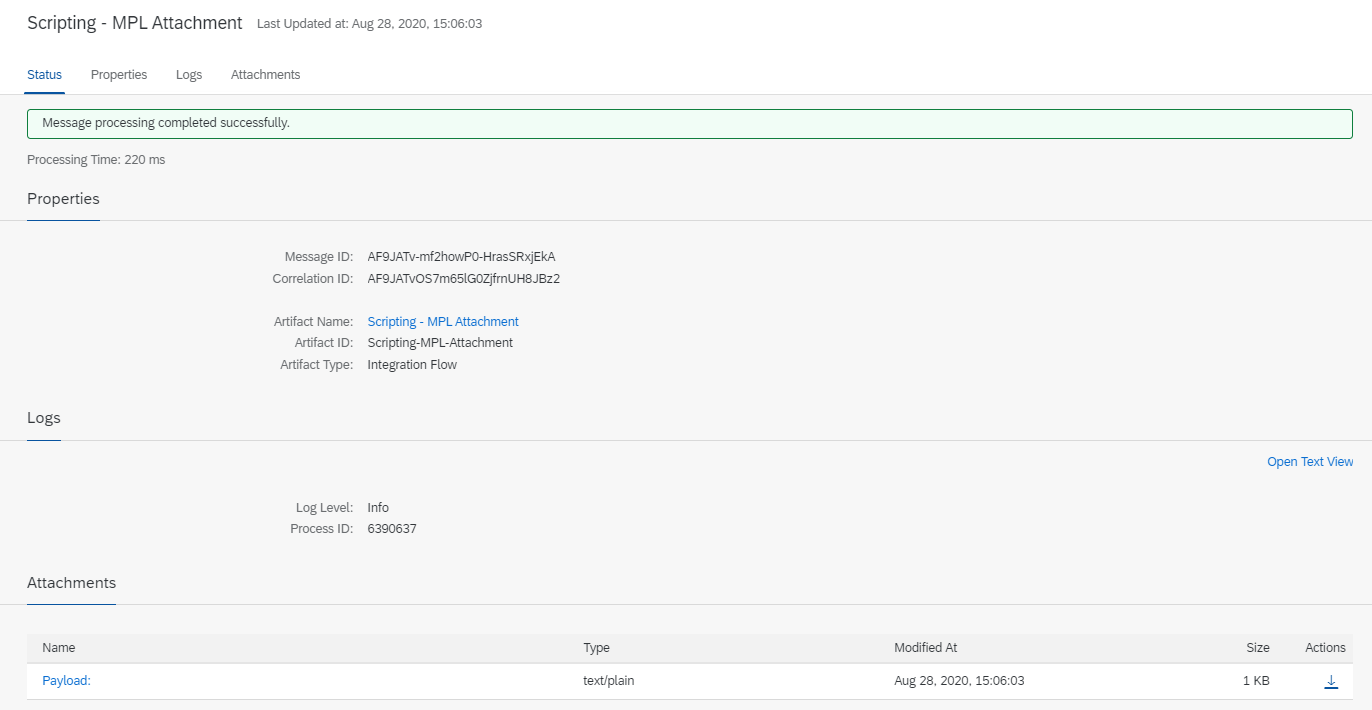
Scroll horizontally to read the screen, or select the image to open it at full size.
What the screen shows A single message’s processing log in the integration platform’s monitoring view: status (“Message processing completed successfully”), message and correlation IDs, the integration flow’s name and the log level.
Decision it explains In a reprocessing decision, which transmission was sent again is shown with a record like this; the audit trail is built on the message ID and the correlation ID.
Data The log belongs to the sample integration flow in the SAP documentation; according to the source, the flow is called with a dummy payload. The IDs shown are test IDs; there is no customer or business transaction data.
Product: SAP Integration Suite (Cloud Integration) Source: SAP-docs/btp-integration-suite © 2022-2023 SAP SE or an SAP affiliate company and btp-integration-suite contributors License: CC BY 4.0, used without modification
How is the running of an integration handed over to operations?
Once an integration is live, first response comes from the team that runs it, not the team that designed it. The handover is an operating note that lets the operations team make the right call without reading the design document.
The note explains what each alert means, the first response steps, who is told and when, and which actions only the technical owner or the process owner may take. Handover is not a one-off meeting. In the first weeks, every new kind of error is added to the operating note and tied to one of the error classes. An error that cannot be classified goes back to the design team. That way, operating knowledge builds up in a shared document rather than in one person’s memory.
Decision table
| Class | Automatic retry | Retry condition | Next step | Record |
|---|---|---|---|---|
| Transient technical | Yes | Operation is idempotent; attempt and time limits not exceeded | Hand over for technical review if limits are exceeded | Every attempt |
| Permanent technical | No | — | Technical fix, then controlled resend | Fix and resend |
| Business error | No | — | Process owner decides; correct through a business transaction | Decision and correction |
| Unknown outcome | Conditional | Status check first; no retry if not idempotent | Hold until status is clear | Check and outcome |
Common wrong assumptions
- “Any error will pass if retried enough.” Permanent errors and business errors do not pass on a retry; they only add load and clutter the records.
- “A timeout means the operation did not happen.” It may have happened. A retry without a status check can create a duplicate record.
- “Messages arrive in the order they were sent.” Retries and parallel processing can break order; if order is needed, it has to be designed.
- “No errors means consistent data.” A lost message may leave no error record; consistency is confirmed through reconciliation.
- “Bulk resending is always safe.” Bulk resending without confirming idempotency and order conditions can spread a single error across many records.
Checklist
- Error classes and their handling are written down for each flow
- Business error messages are designed in terms the process owner understands
- The idempotency method and the retention period for operation identifiers are set on the receiving side
- The order requirement is defined at business-object level; the rule for older messages is written down
- Retry parameters are set: attempts, wait, variation, overall time limit, circuit breaker
- A status check route is defined for unknown outcomes
- Stop criteria for automatic retries are written down and visible on the monitoring screen
- Permissions to view, correct, resend and cancel are separated
- A completion or compensation route is written for partial success
- Regular reconciliation is defined
- Log masking, retention period and audit trail fields are set
- An operating note is prepared and will be updated with new kinds of error in the first weeks
Limits of this guide
This guide is a product-independent general engineering explanation. The definition of idempotent methods rests on IETF RFC 9110; the other principles are general engineering knowledge and Castintech’s assessment framework, and are not attributed to SAP. How far the tools you use support these principles should be checked against your product and release scope. We do not claim any particular error rate or downtime outcome.
Frequently asked questions
How many times should a message be retried?
There is no single right number for every flow. It depends on how long the other system usually takes to recover and on the latest time the business needs to see the outcome of the message. An overall time limit is a more meaningful control point than a number of attempts.
How long can a failed message wait?
The business decides: at what point does a delayed outcome become a business problem? That period is monitored as a warning threshold for the age of the oldest waiting message, and the responsible person is notified when it is exceeded.
Can the technical team fix a business error?
The technical team can prepare and apply the correction, but the process owner decides how the data should be corrected. The correction is made through the system’s normal business transactions and is recorded.
How can you tell an integration is healthy?
A low error count is not enough on its own. Waiting message volume, the age of the oldest waiting message, the spread of errors by class and the results of regular reconciliation, watched together, give a reliable picture of health.
Is idempotency needed for every flow?
It is needed for every flow where automatic retries or bulk resends will be made. Even in flows where nothing is retried and every error goes to a human decision, it is recommended because it limits the effect of an accidental resend.
Related pages and guides
- Integration approach: the overall frame for system boundaries, data ownership and integration decisions
- Technical uncertainties before a transformation: where integrations sit in a transformation plan
- Gathering evidence in a performance investigation: investigating integration delays through measurement
- All technical guides
Sources
Bracketed numbers in the text refer to the sources below.
- 1
RFC 9110: HTTP Semantics — IETF, June 2022, section 9.2.2 “Idempotent Methods”.
https://www.rfc-editor.org/rfc/rfc9110.html
Source date: June 2022 Last verified: 23 September 2026
The other principles in this guide are general engineering knowledge; they do not rest on any product documentation and are not attributed to SAP.
Last verified: 23 September 2026
SAP is the trademark or registered trademark of SAP SE or its affiliates in Germany and in other countries.
This content has been independently prepared by Castintech.
Independence note
- Castintech does not claim any partnership, authorization, endorsement or sponsorship relationship with SAP SE.
- SAP and the SAP product names mentioned on this page are trademarks of SAP SE or its affiliates.
- The work Castintech offers is independent technical consulting and support.